Installing Toosheh: Windows, Android and Linux
It all begins with one small program. Install the Toosheh app step by step on Windows, Android and Linux — with the official video and fixes for common errors.
It all begins with one small program: Toosheh Extractor. It is the software that turns the raw file recorded from the satellite into news, films and books. Installing it takes only a few minutes, but there is one vital point:
Only get it from the official source; a tampered build is exactly the trap you are trying to escape.
Official tutorial video: the Toosheh organization has published a video on operating the software that shows the whole flow; if you get stuck anywhere, watch that first.
Requirements
- Windows: Windows 7 or later. The program needs the .NET Framework; if it's missing, the install fails with an error and you must install .NET first.
- Android: Android 7 or later. To connect the drive to the phone you also need an OTG cable — a cheap adapter that lets the phone read a USB stick.
- Linux: there is a ready-made executable.
Installing on Windows
- 1Get the official installer from the Windows installer.
- 2Double-click the MSI file and follow the installation steps.
- 3If Windows says "the .NET Framework is outdated", stop, install .NET from Microsoft's site, then come back.
- 4When it finishes, the Toosheh icon appears on the desktop. On opening it you'll see the "Satellite" section — exactly where Using the Toosheh app teaches you the controls step by step.
Installing on Android
- 1Search Google Play for "Toosheh Extractor" or install directly from the official app page.
- 2If you can't reach Google Play, download the official installer (APK) from toosheh.org and install it.
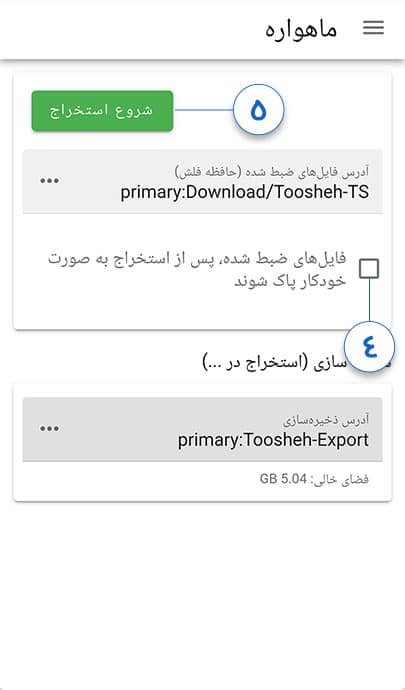
- 3Open the app; on first launch it asks you to set the storage location.
Installing on Linux
Get the executable of the Linux version, give it execute permission and run it. The interface is the same.
If the install fails
- ".NET Framework is outdated": the most common Windows error; update .NET.
- Windows XP: not supported; you need a newer Windows.
- Updating the app: a new version appears now and then; only update from official sources, never from a link someone forwarded you.
- Nothing happens on double-click: the download was incomplete or blocked; fetch the installer again from the official link above.
The next step
Once the program is installed, you're only halfway. Now you have to pull real data from the satellite: go to Setup and satellite reception. The overview and every official link live in the Toosheh main file; why this tool helps on shutdown day is in the Prisonbreak file. Install it today; on shutdown day there is no time left to install.